

The Complete Social Media Image Size Guide
Keeping track of the constantly changing image sizes across all social platforms can feel like a full-time job! Every platform optimises visuals differently. Some crop, some stretch, and some compress your images beyond recognition.
To make things easier, I’ve pulled together a single, up-to-date guide covering all major social platforms and their recommended image dimensions.
Below you’ll find:
✔ A quick-glance summary
✔ Accurate image specs for each platform
✔ Notes on mobile vs desktop differences
✔ Tips where platforms apply cropping or compression
Here are the social media image sizes we’ll be talking about:
-
Facebook image sizes
-
Instagram image sizes
-
LinkedIn image sizes
-
X (Twitter) image sizes
-
TikTok images sizes
-
Pinterest image sizes
-
YouTube image sizes
-
Google Business Profile image sizes
Quick Summary of Main Social Media Image Sizes
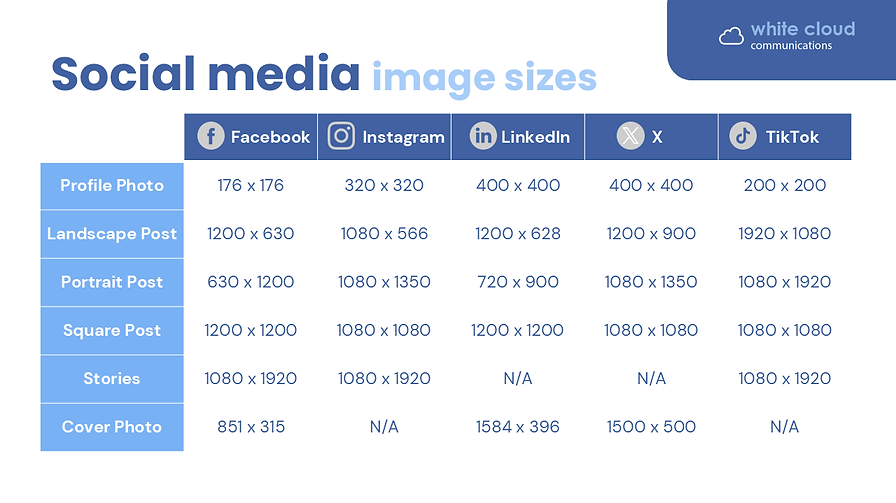
We will go into more detail below, but here’s a quick snapshot of all the basic social media image sizes that you probably use most often.
1. Facebook Image Sizes
On Facebook, one of the biggest challenges is that images display differently on desktop and mobile, especially cover photos and profile images. Make sure to preview your assets on both.
Recommended image sizes:
-
Profile picture (desktop): 176 × 176 px
-
Profile picture (mobile): 196 × 196 px
-
Cover photo: 851 × 315 px (safe area is much narrower—text should sit within ~560 × 315 px)
-
Landscape feed image: 1200 × 630 px
-
Event image: 1920 × 1005 px
-
Stories: 1080 × 1920 px
-
Carousel ad: 1080 × 1080 px
-
Single image ad: 1200 × 630 px
-
Marketplace ad: 1200 × 1200 px
-
Stories ad: 1080 × 1080 px (square is recommended though 1080 × 1920 also works)
-
Reels ad: 1080 × 1920 px

2. Instagram Image Sizes
Instagram remains a highly visual platform where image ratios matter. Feed, grid, and ad placements can crop images differently.
Recommended image sizes:
-
Profile picture: 320 × 320 px
-
Landscape image: 1080 × 566 px (feed)
-
Vertical image: 1080 × 1350 px
-
Square image: 1080 × 1080 px
-
Carousel: 1080 × 1080 px or 1080 × 1350 px
-
Stories: 1080 × 1920 px
-
Reels: 1080 × 1920 px
-
Landscape ad: 1080 × 566 px
-
Vertical ad: 1080 × 1350 px
-
Square ad: 1080 × 1080 px

3. LinkedIn Image Sizes
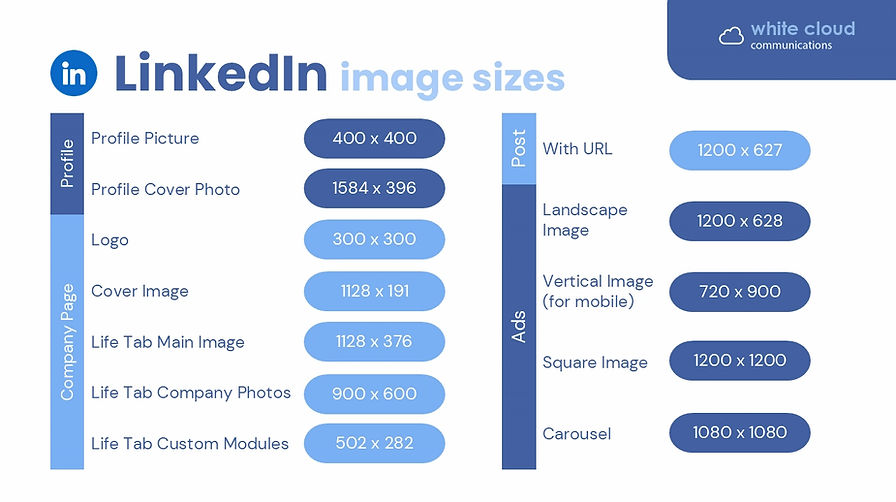
LinkedIn crops images differently on desktop vs mobile and varies requirements between personal profiles and company pages. Always upload high-quality images with safe margins.
Recommended image sizes:
-
Personal profile picture: 400 × 400 px
-
Personal profile background image: 1584 × 396 px
-
Company logo: 300 × 300 px
-
Company cover image: 1128 × 191 px
-
Post with URL preview: 1200 × 627 px
-
Life Tab main image: 1128 × 376 px
-
Life Tab custom modules: 502 × 282 px
-
Life Tab company photos: 900 × 600 px
-
Landscape ad image: 1200 × 628 px
-
Square image ad: 1200 × 1200 px
-
Vertical image ad: 720 × 900 px
-
Carousel: 1080 x 1080 px
4. X (Twitter) Image Sizes
X (formerly Twitter) is still largely a real-time platform, and visuals help posts stand out in fast-moving feeds. While X compresses heavily, starting with the correct sizes helps maintain clarity.
Recommended image sizes:
-
Profile picture: 400 × 400 px
-
Header image: 1500 × 500 px
-
Card image: 120 × 120 px (for summary cards)
-
In-stream landscape image: 1280 × 720 px
-
In-stream vertical image: 720 × 1280 px
-
In-stream square image: 720 × 720 px
-
In-stream GIF: 1280 × 1080 px (aspect ratios vary; this is safe)
-
Image ad with app buttons: 800 × 418 px or 800 × 800 px
-
Image ad with conversation buttons: 800 × 418 px
-
Image ad with polls: 800 × 418 px or 800 × 800 px
-
Image ad with website buttons: 800 × 418 px or 800 × 800 px
-
Standalone image ad: 1200 × 1200 px or 1200 × 628 px

5. TikTok Image Sizes
TikTok is a vertical-first platform where 9:16 is king. Use full-screen visuals wherever possible.
Recommended image sizes:
-
Profile image: 200 × 200 px
-
Videos, stories & carousels: 1080 × 1920 px
-
Vertical ad: 1080 × 1920 px
-
Landscape ad: 1920 × 1080 px
-
Square ad: 1080 × 1080 px

6. Pinterest Image Sizes
Pinterest is a highly visual, search-driven platform. Vertical images typically perform best, especially 2:3 ratio Pins.
Recommended image sizes:
-
Profile image: 165 × 165 px
-
Profile cover: 1920 × 1080 px
-
Standard Pin: 1000 × 1500 px (2:3) or 1000 × 1000 px
-
Collection Pin: 1000 × 1500 px or 1000 × 1000 px
-
Idea Pin / Story Pin: 1080 × 1920 px
-
Standard image ad: 1000 × 1500 px
-
Standard width video ad: 1080 × 1080 px / 720 × 1080 px / 864 × 1080 px / 1080 × 1920 px
-
Max width video ad: 1080 × 1080 px
-
Carousel ad: 1080 × 1080 px or 1000 × 1500 px
-
Collection ad: 1080 × 1080 px or 1000 × 1500 px
-
Idea ad: 1080 × 1920 px

7. YouTube Image Sizes
YouTube uses several visual formats—from thumbnails to channel banners—and each has specific safe areas.
Recommended image sizes:
-
Profile photo: 800 × 800 px
-
Channel banner: 2560 × 1440 px (text safe area: 1546 × 423 px)
-
Video upload (standard): 1920 × 1080 px
-
YouTube Shorts: 1080 × 1920 px
-
Thumbnail: 1280 × 720 px
-
Stories: 1080 × 1920 px
-
In-stream ads: 1920 × 1080 px
-
In-feed ads: 1280 × 720 px
-
Bumper ads: 1920 × 1080 px
-
Display ads: 300 × 60 px
-
Overlay ads: 480 × 70 px

9. Google Business Profile Image Sizes
Your Google Business Profile images help customers quickly assess your brand, location and services. High-quality, bright images perform best.
Recommended image sizes:
-
Logo: 720 × 720 px
-
Cover photo: 1024 × 576 px
-
Image posts: 720 × 720 px
-
Video posts: 1280 × 720 px

Need help creating content that truly stands out?
Get in touch and I can help you create standout, on-brand assets for every platform.